What changed, one update at a time

I build this by myself. Every change goes here, in plain words. Newest first.

Pick an update. Arrow keys or a swipe work too.

1.14

November 2026

Coming soon

Google is checking this one right now. When they say yes, your copy updates by itself. You do not have to do anything.

AI helpers and Chromebook keys

  • Agent Link (Pro). An AI on your own computer, like Claude, can now find the buttons on a page, build the clicks and run them for you. It only talks to your computer, never to the internet.

  • Easier keys on Chromebooks. Start and stop is Alt + Z, add a step is Alt + X. F6 and F7 are hard to find on a Chromebook keyboard, so new installs get these instead.

  • Salut, Romania. Lots of you are from Romania, so the store page now speaks Romanian.

  • Clear messages when real clicks are blocked. Some school Chromebooks block the real-click mode. Now it tells you that, in plain words, instead of failing quietly.

  • A small "rate it" card. After a few good runs it asks once if you want to rate it. Press "Not now" and it waits. It never nags.
1.13

September 25, 2026

Live

One day after the first release. Yes, I was fast. I could not stop.

Smoother scrolls, a free Pro day

  • Scrolls and swipes glide. They move in small steps now, like a real hand, instead of jumping. You can set how fast they go.

  • It keeps going after a refresh (Pro). If the page reloads, the clicks pick up where they stopped.

  • Your first day is Pro, for free. Try recording and the rest before you pay anything.

  • Honest note: free saves 3 sequences now, not 5. Pro had to mean something. Loop, every kind of step and both click modes stay free. Forever.

1.11

September 24, 2026

Live

The first day on the Chrome Web Store. Everything below came out together.

Day one: clicks that count

  • Real clicks. Most auto clickers send fake clicks, and games ignore them. Precise mode sends real ones, so games and click tests count them. Light mode is the fast one for normal pages.

  • A list of steps, not one dot. Up to 500 steps: press, hold, swipe, scroll, or follow your mouse. Each one has its own timing.

  • You can see every step. Each one shows on the page as a numbered X. Drag it to move it.

  • Record (Pro). Do it once with your mouse, and it copies you.

  • Share a whole sequence as one line of text. Send someone a PAC- code and they get your exact steps.

  • One switch turns it fully off. Off means off. Nothing keeps running in the background.

1.0

September 15 – 23, 2026

The beginning

Nine days, about ten versions, and a lot of "that is broken, fix it".

It started with one dot

  • Version 1.0 clicked one dot. That was the whole thing. But the click was real, and that part was the hard part.

  • The same night it learned to click many dots in a row. That is when it turned into what it is now.

  • Then, round after round of testing. Every round found something broken. I fixed it, and tested again, until it held up.

What it can do right now

Everything in one place. The free part stays free. Pro is for when you use it a lot.

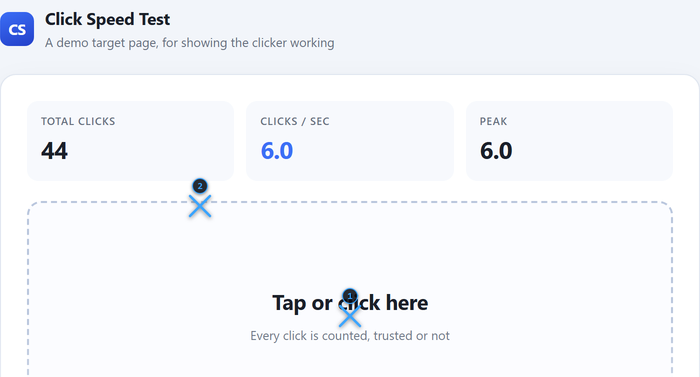
A click test page with two numbered blue X markers on it
Every step shows on the page as a numbered X.
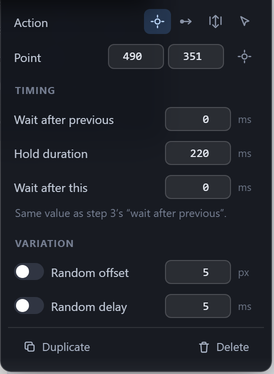
The step editor: action, point, wait, hold time, random offset and random delay
Every step has its own timing.
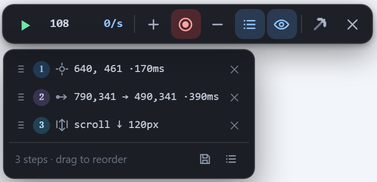
The toolbar with Record on, and three steps it recorded
Record writes the steps for you (Pro).
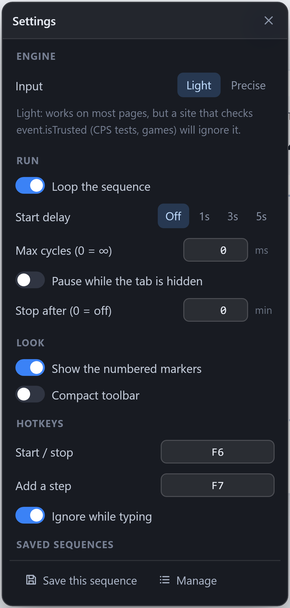
The settings window: engine, loop, start delay, hotkeys and saved sequences
Settings sit right on the page.

Free

$0, no account, no time limit

  • Up to 500 steps in a sequence
  • Press, hold, swipe, scroll, or follow your mouse
  • Real clicks for games, fast clicks for normal pages
  • Loop it, add a start delay, stop after a number of loops
  • Random timing and random position, so it looks human
  • Hotkeys: F6 and F7, or Alt + Z and Alt + X on new Chromebooks 1.14
  • 3 saved sequences, share codes and .pac files
  • One switch that turns it fully off
Add to Chrome

Pro

$15 once, or $5 every 3 months. Your first day is free.

  • Record: do it once, it copies you
  • 50 saved sequences
  • Stop by itself after a number of minutes
  • Keep going after the page refreshes
  • Points that stay on the right spot when the page scrolls
  • Agent Link: let an AI on your computer run it 1.14
See Pro