For Chrome · works on any page you can open

The auto clicker that works where the others don't

Most extensions fire synthetic clicks, and synthetic clicks are thrown away by canvas games, speed tests and any control that asks whether a person made them. The counter climbs, and nothing on the page moves. This one sends input through Chrome's own pipeline, so the page receives it. Build a sequence of presses, swipes and scrolls — or press Record, do the job once by hand, and let it replay it for you.

Coming soon to the Chrome Web Store See it record

Free forever for everything you build by hand. No account, no click quota, no time limit.

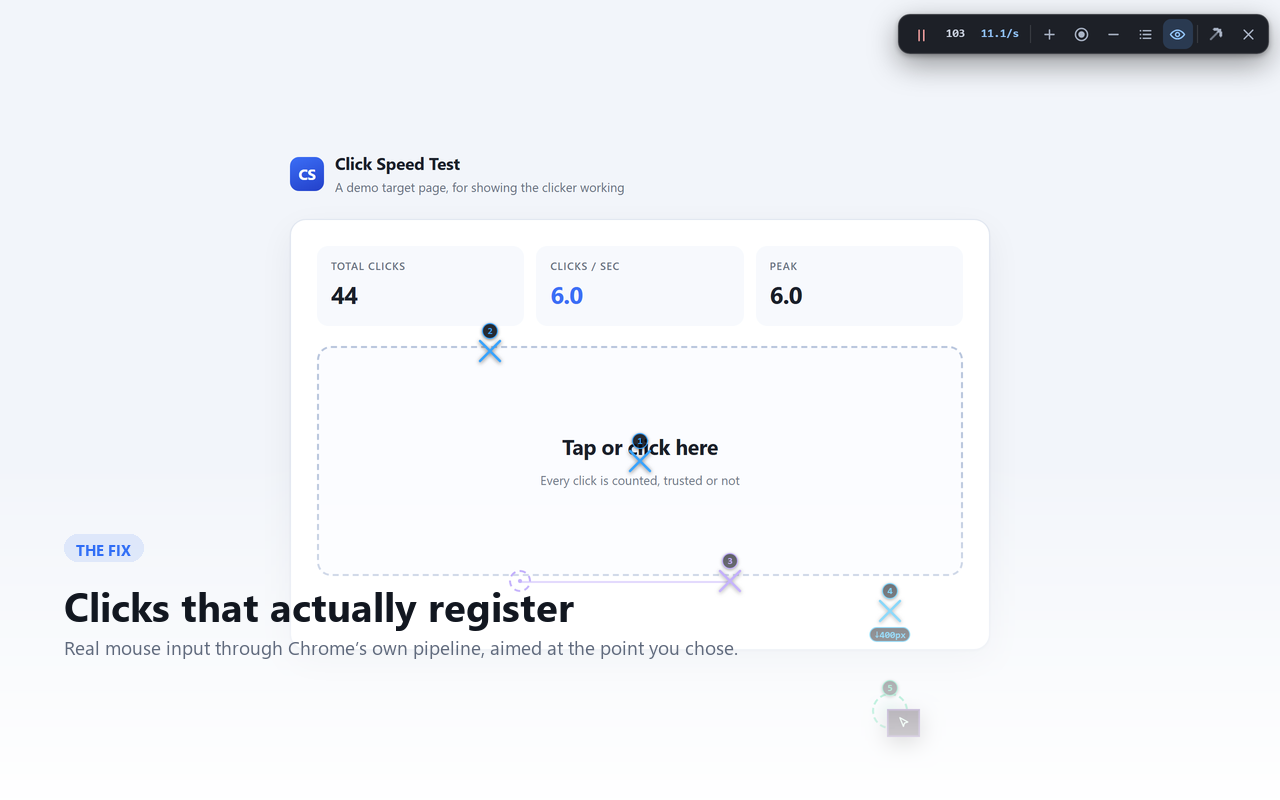
A sequence running on a page, with the step markers visible

Why most auto clickers do nothing on the page you care about

An ordinary extension can only fire synthetic events, and a synthetic event arrives flagged as not-real. Canvas games, click-speed tests and any control that asks “was this a person?” drop those on arrival — which is why the counter climbs and the page never moves. This extension ships both approaches and lets you pick, per sequence.

Precise — input through Chrome itself

Actions are delivered through Chrome's own input pipeline, so the page sees the same events it would see from your hand. This is the one that works on pages which reject synthetic input. Chrome shows its own “debugging this browser” notice while it is active, and the debugger detaches the moment the run stops.

Light — no debugger, nothing to notice

Runs entirely inside the page, with no debugger attached and no browser notice. Faster to start and lighter to run. It is the right choice for the majority of pages, and it is what the extension falls back to on its own if the precise route is unavailable.

Four things a step can do

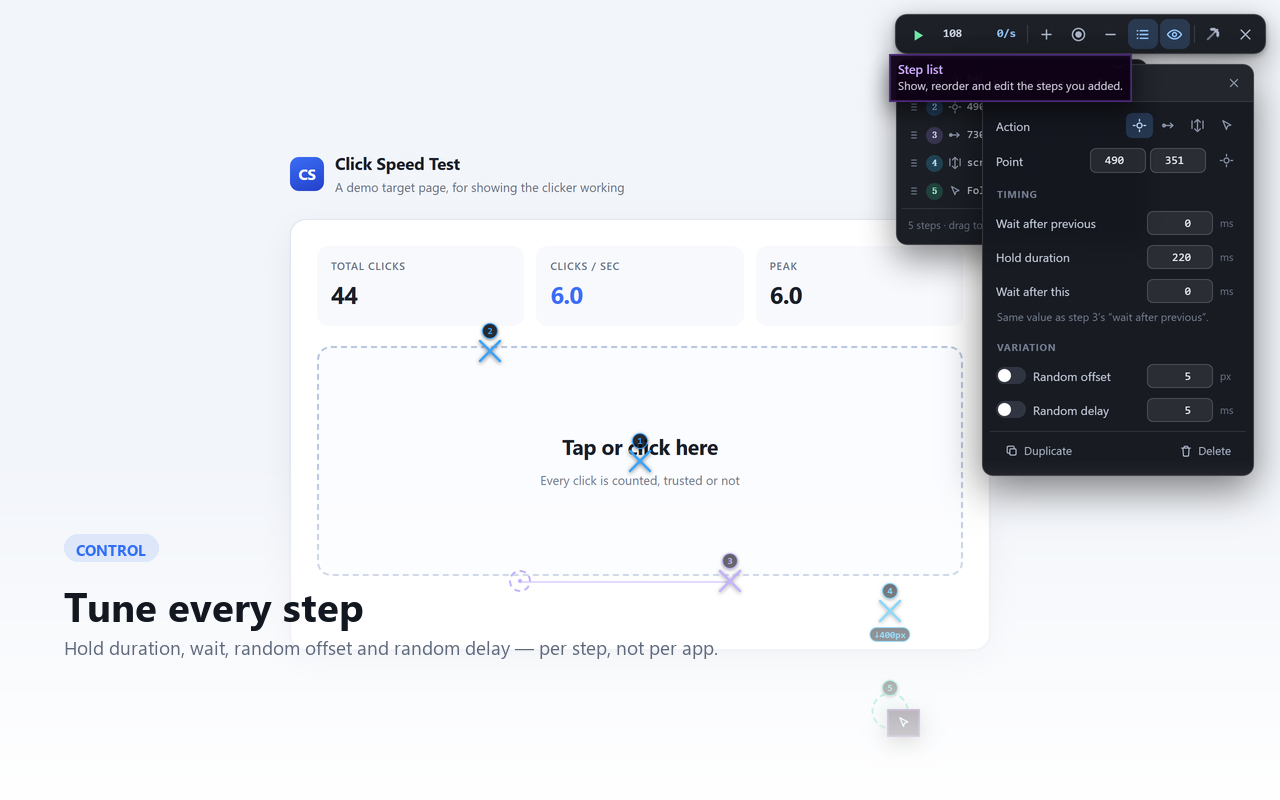
A sequence is a list of steps. Each one is placed on the page by dragging a marker, and each keeps its own timing — so one sequence can hold a long press, a swipe and a scroll without any of them sharing settings.

Press and hold

A single press at one point, held down for as long as the step says. A duration of zero presses and releases in the same instant — the panel says exactly what it will do, rather than quietly adding a minimum.

Swipe

Drag from one point to a second one, with a real travel path rather than a jump. Both ends are draggable on their own, so a gesture can be reshaped one end at a time.

Scroll

Scroll up or down by an amount you set, at the point you choose. The wheel event reaches the page's own handlers, and the nearest scrollable container under that point actually moves.

Follow the cursor

Acts wherever your mouse is at the moment the step runs, instead of at a stored point. Useful for reaching things that move, or that you want to decide on as you go.

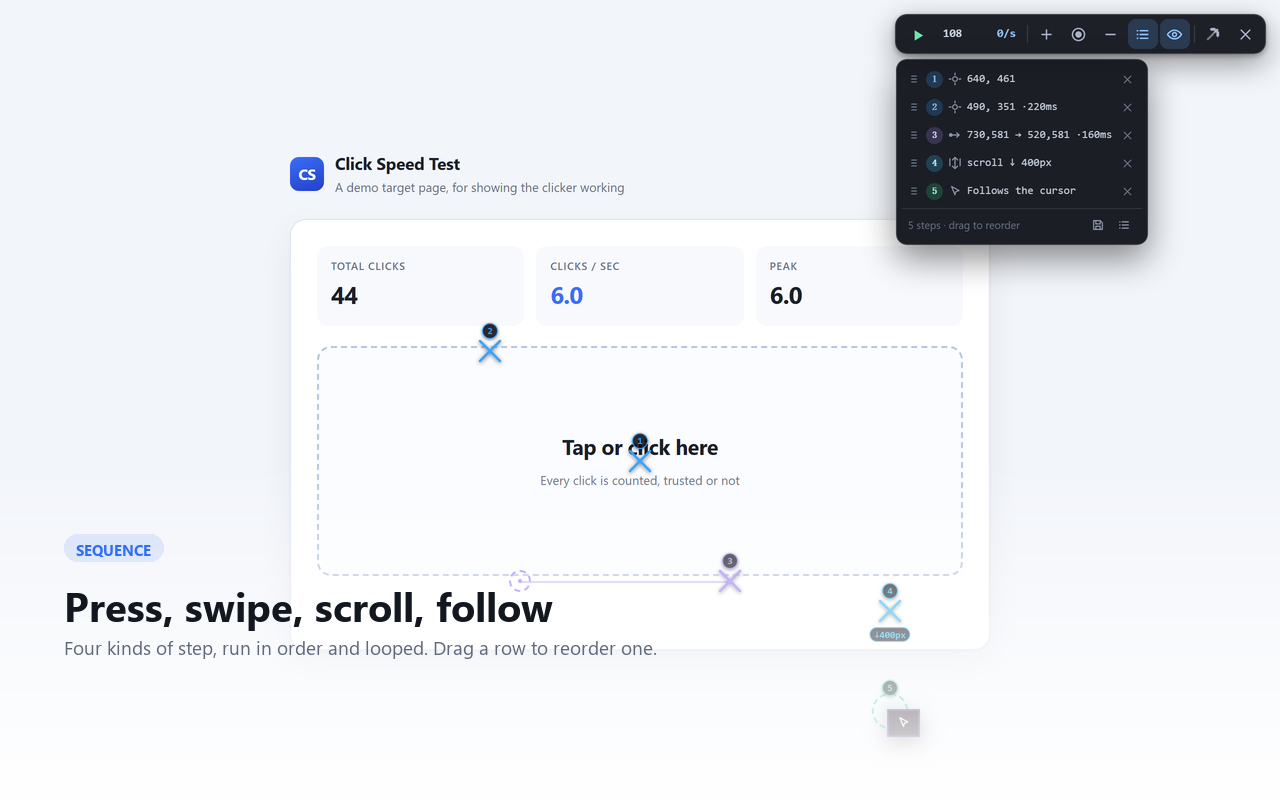
Every step is visible. Each one is drawn on the page with its number beside it, clear of the exact point it acts on. Hover any toolbar button and it tells you what it does and which key is bound to it.

Or don't build it — record it

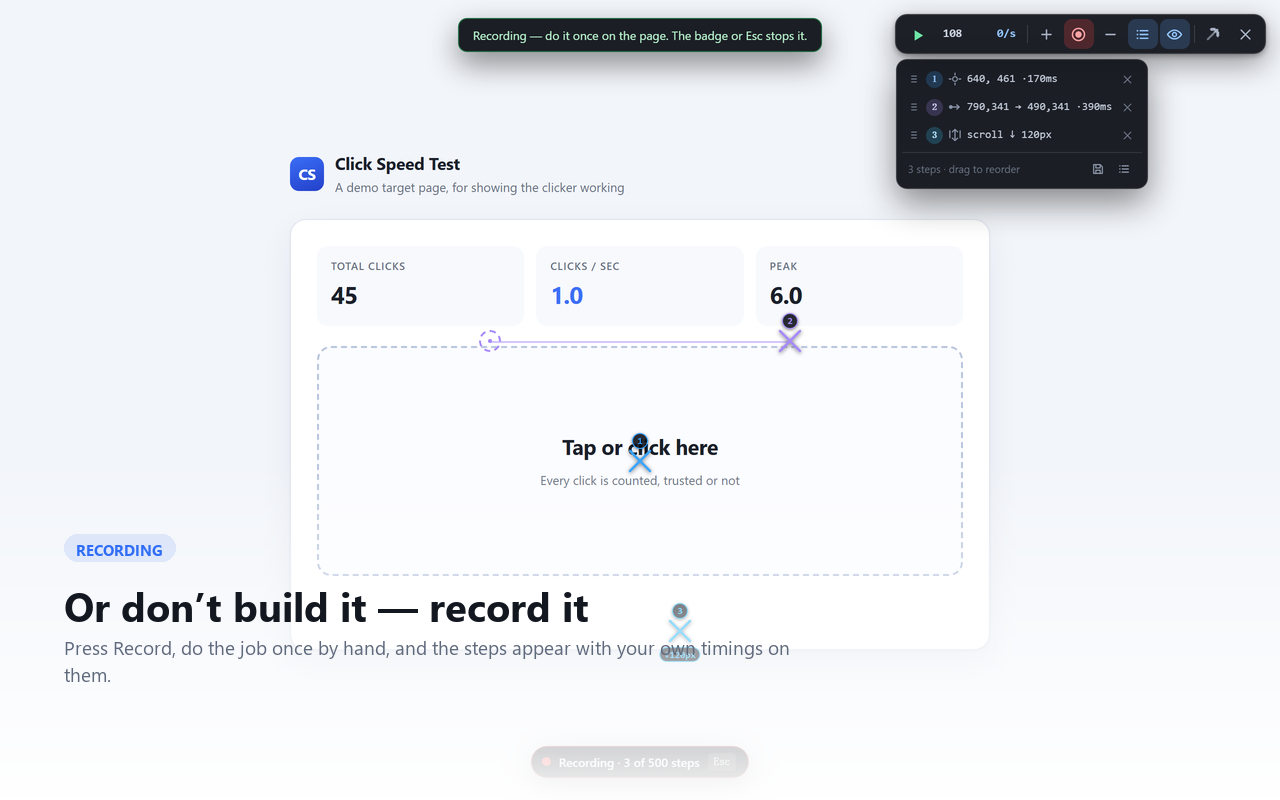
Placing points by hand is fine for two steps and tedious for twenty. Press Record, do the job once at the pace you would really do it, press stop, and the steps are there — presses, swipes and scrolls, in order, at the points you actually hit, with the pauses you actually took.

Only your own input

Events a page fires at itself are not gestures, and are ignored. The toolbar, the panels and the markers are not recorded either — those are you talking to the extension, not to the page. And nothing is recorded while a sequence is running, so a sequence can never quietly record itself into a loop.

Ordinary steps afterwards

A recorded step is the same object as a hand-placed one. Drag it, retime it, delete it, run it at full speed. Recording is a way to get a sequence — not a separate mode with separate rules.

Recording is part of Pro. Everything else on this page — both engines, every step type, the editor, sharing — is free, and stays free.
Three steps on the page, recorded from a real press, drag and scroll

Built to be looked at

A sequence is not a script you hope behaves — you can see every point, change any of them, and reorder the list by dragging.

The step list
Editing one step

Pricing

Free runs anything you can describe: every action, both engines, up to 500 steps in a sequence, and no click quota. What free does not do is build the sequence for you — you place the points and you set the timings, and for a routine you already know by hand that is the slow part.

Free

Everything you build by hand

$0

No account, no time limit, no nag screen.

  • Up to 500 steps of every type
  • Both engines, and per-sequence choice
  • Up to 3 saved sequences
  • Pro switched on for your first 24 hours
  • Share codes and file import
  • The on/off switch, and the honest privacy
Coming soon
Pro

Stop building it by hand

$15 once

Or $5 every 3 months, if you would rather spread it out.

  • Recording — do it once, get the steps
  • 50 saved sequences instead of 3
  • Auto-stop after a set number of minutes
  • Three devices per key, and a slot can be released
  • Every future update
  • Same features as the subscription — one build
Buy once Or subscribe — $5 / 3 months
Both Pro options unlock exactly the same features; the only difference is whether it ends. If it does not do what this page describes, say what did not work within 14 days and it is refunded — no questions.

Questions

Does it work on pages that ignore simulated clicks?

Yes — that is what the precise engine is for. It routes input through Chrome's own pipeline instead of dispatching events from JavaScript, so the page receives input it cannot tell apart from yours. Sites that reject scripted clicks are the reason both engines exist.

Where does my data go?

Nowhere. Settings and sequences are stored in your browser's local storage and are never uploaded — there is no account and no server that receives them. A one-time licence is verified on your machine, and contacts our licence server once when you first enter it (a key works on three devices, and counting them needs the server) and never again. A subscription is checked about once a week. If you never enter a licence, the extension makes no requests at all — the privacy page has the detail.

How many computers can I use one licence on?

A one-time licence works on three devices, and you can see how many are left in the Pro section of the settings. Reinstalling the extension on the same browser profile does not use another one. If you run out, a device you no longer use can be released so the slot can be reused — so a replaced laptop is a support message, not a purchase.

What is the switch at the top for?

Turning the whole extension off — thoroughly. Off means the browser stops loading it into your pages at all, and any page that already had it has the panel removed and every listener detached. It is not a hidden toolbar; there is nothing left running.

Can I move a sequence to another computer?

Yes, two ways. A share code carries the entire sequence inside the code itself, so it works on a machine that has never talked to ours. Or export a file and import it anywhere. A file that is not one of ours is refused with a reason rather than half-loaded.

What happens when the free day of Pro runs out?

For the first 24 hours after you install, recording, page-anchored points and the auto-stop timer are all switched on, so you can try the thing Pro actually sells rather than take this page's word for it. When the day ends those three switch off and what they produced is removed: sequences you recorded, the points you anchored to the page, saved sequences beyond the free three, and the auto-stop timer's setting. Steps you placed by hand, and your first three saved sequences, are left exactly as they are. The settings window counts the day down and names what will go, before it goes.

Do I have to place every point by hand?

Only on the free version. Pro adds recording: press Record, do the job once by hand, and the steps come out already placed and already timed — then edit them like any other sequence. It is the one feature that is not free, because it is the one that replaces the work.

Is this allowed to be used on any site?

You are responsible for how you use it, and for the rules of the sites you use it on. It is a general-purpose automation tool, not a tool for circumventing a site's terms, and it does nothing to hide what it is. One thing worth knowing: automating clicks can break the rules of competitive or multiplayer games, and cost you the account — check the rules of the game you have in mind before pointing it at one.

Refunds?

If it does not do what this page says it does, ask within 14 days and it is refunded. See the terms.